
Free Laravel Vue 3.x Tailwind 4.x Dashboard
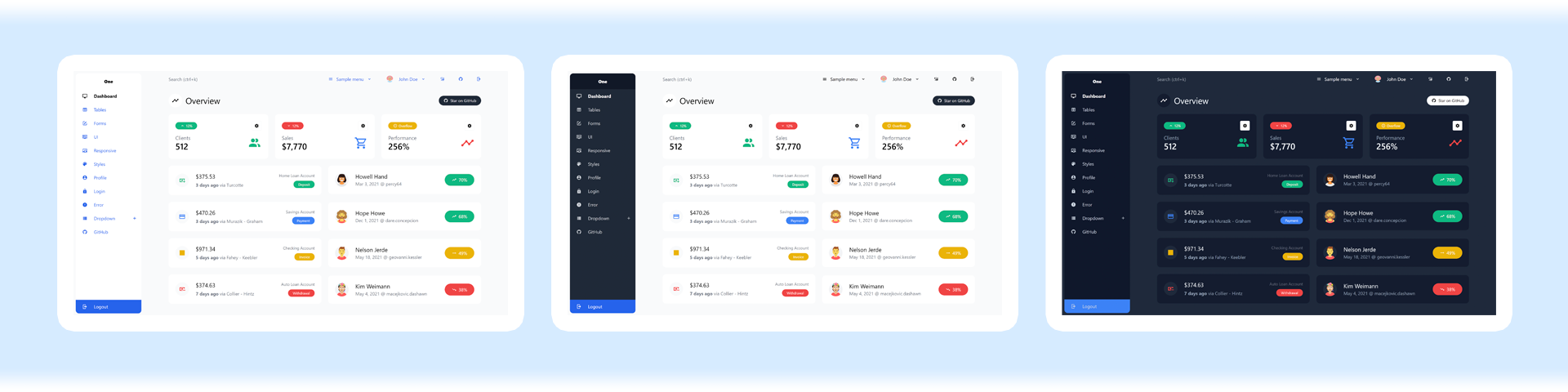
This guide will help you integrate your Laravel application with Admin One - free Vue 3 Tailwind 4 Admin Dashboard with dark mode.
Admin One is simple, fast and free Vue.js 3.x Tailwind CSS 4.x admin dashboard with Laravel 12.x integration.
- Built with Vue.js 3, Tailwind CSS 4 framework & Composition API
- Laravel build tools
- Laravel Jetstream with Inertia + Vue stack
- SFC
<script setup>Info - Pinia state library (official Vuex 5)
- Dark mode
- Styled scrollbars
- Production CSS is only ≈38kb
- Reusable components
- Free under MIT License
Table of contents
- Install
- Copy styles, components and scripts
- Add pages
- Fix router links
- Add Inertia-related stuff
- Upgrading to Premium version
- Optional steps
- Laravel & Inertia docs
Install
Install Laravel
First, install Laravel application
Install Jetstream
Then cd to project dir and install Jetstream with Inertia Vue stack
composer require laravel/jetstream

php artisan jetstream:install inertia

php artisan migrate

npm install
Install dependencies
npm i pinia @mdi/js chart.js numeral -D
Copy styles, components and scripts
Before you start, we recommend to rename Laravel Jetsreams's original folders (so you'll keep them for future reference) — resources/js/Components resources/js/Layouts resources/js/Pages to something like ComponentsJetsteam, LayoutsJetstream, etc.
Now clone justboil/admin-one-vue-tailwind project somewhere locally (into any separate folder)
Next, copy these files from justboil/admin-one-vue-tailwind project directory to laravel project directory:
- Copy
tailwind.config.jsto/ - Copy
src/componentssrc/layoutssrc/storessrc/colors.jssrc/config.jssrc/menuAside.jssrc/menuNavBar.jstoresources/js/ - Copy
.laravel-guide/resources/js/toresources/js/ - Delete
resources/css/app.css - Copy
src/csstoresources/css
[optional] lowecase vs Capitalized folder names
Fresh Laravel install with Jetstream provides Capitalized folder names such as Components, Layouts, etc. For the sake of simplicity we just follow Vue conventions with lowercase folder names. However, you may opt-in to capitalize folder names:
- Make sure you've removed original Laravel Jetstream's
resources/js/Layoutsandresources/js/Componentsfolders - Rename the folders you've copied in the previous section:
resources/js/layoutstoLayouts;componentstoComponents;storestoStores - Replace everywhere in imports:
@/layouts/with@/Layouts/;@/components/with@/Components/;@/stores/with@/Stores/
In tailwind.config.js
Please make sure, you've copied template's tailwind.config.js. Then replace content, to reflect Laravel's structure:
module.exports = {
  content: [
    './vendor/laravel/framework/src/Illuminate/Pagination/resources/views/*.blade.php',
    './storage/framework/views/*.php',
    './resources/views/**/*.blade.php',
    './resources/js/**/*.vue',
    './resources/js/**/*.js'
  ]
  // ...
}
In resources/views/app.blade.php
- Remove
<link rel="stylesheet" href="https://fonts.bunny.net/css2?family=Nunito:wght@400;600;700&display=swap">
Add Pages
Let's just add first page. You can repeat these steps for other pages, if you wish to.
First, copy src/views/HomeView.vue (from justboil/admin-one-vue-tailwind project) to resources/js/Pages/ (in your Laravel project).
Then, open resources/js/Pages/HomeView.vue and add <Head>:
<script setup>
import { Head } from '@inertiajs/vue3'
// ...
</script>

<template>
  <LayoutAuthenticated>
    <Head title="Dashboard" />
    <!-- ... -->
  </LayoutAuthenticated>
</template>
Add route in routes/web.php. There's a /dashboard route already defined by default, so just replace Inertia::render('Dashboard') with Inertia::render('HomeView'):
Route::get('/dashboard', function () {
  return Inertia::render('HomeView');
})->middleware(['auth', 'verified'])->name('dashboard');
Fix router links
Here we replace RouterLink with Inertia Link.
resources/js/menuAside.js and resources/js/menuNavBar.js
Optionally, you can pass menu via Inertia shared props, so you'll be able to control it with PHP. Here we'd just use JS.
to should be replaced with route which specifies route name defined in routes/web.php. For external links href should be used instead. Here's an example for menuAside.js:
export default [
  'General',
  [
    {
      route: 'dashboard',
      icon: mdiMonitor,
      label: 'Dashboard'
    },
    // {
    //   route: "another-route-name",
    //   icon: mdiMonitor,
    //   label: "Dashboard 2",
    // },
    {
      href: 'https://example.com/',
      icon: mdiMonitor,
      label: 'Example.com'
    }
  ]
]
Route names reflect ones defined in routes/web.php:
Route::middleware(['auth:sanctum', 'verified'])->get('/dashboard', function () {
    return Inertia::render('Home');
})->name('dashboard');

// Route::middleware(['auth:sanctum', 'verified'])->get('/dashboard-2', function () {
//     return Inertia::render('Home2');
// })->name('another-route-name');
Now, let's update vue files, to make them work with route names and Inertia links.
resources/js/components/AsideMenuItem.vue
Replace RouterLink imported from vue-router with Link import in <script setup> and add consts:
<script setup>
import { Link } from '@inertiajs/vue3'
// import { RouterLink } from "vue-router";
// ...

// Add itemHref
const itemHref = computed(() => (props.item.route ? route(props.item.route) : props.item.href))

// Add activeInactiveStyle
const activeInactiveStyle = computed(() =>
  props.item.route && route().current(props.item.route)
    ? darkModeStore.asideMenuItemActiveStyle
    : ''
)

// ...
</script>
In <template> section:
- In
<component>removev-slotand:toattributes; replace:iswith:is="item.route ? Link : 'a'"and:hrefwith:href="itemHref" - Inside
<component>replace:classattribute for both<BaseIcon>components,<span>and another<BaseIcon>with:class="activeInactiveStyle" - ...and for
<span>(also inside<component>) replace:classattribute with:class="[{ 'pr-12': !hasDropdown }, activeInactiveStyle]"
resources/js/components/BaseButton.vue
Replace RouterLink imported from vue-router with Link import in <script setup>:
<script setup>
import { Link } from '@inertiajs/vue3'
// import { RouterLink } from "vue-router";
// ...
</script>
Replace to prop declaration with routeName:
const props = defineProps({
  // ...
  routeName: {
    type: String,
    default: null
  }
  // ...
})
Fix const is declaration, so it returns the Link component when props.routeName is set:
const is = computed(() => {
  if (props.as) {
    return props.as
  }

  if (props.routeName) {
    return Link
  }

  if (props.href) {
    return 'a'
  }

  return 'button'
})
Remove :to and replace :href in <component> with :href="routeName ? route(routeName) : href":
<template>
  <component
    :is="is"
    :class="componentClass"
    :href="routeName ? route(routeName) : href"
    :type="computedType"
    :target="target"
    :disabled="disabled"
  >
    <!-- ... -->
  </component>
</template>
resources/js/components/NavBarItem.vue
Replace RouterLink imported from vue-router with Link import in <script setup>:
<script setup>
import { Link } from '@inertiajs/vue3'
// import { RouterLink } from "vue-router";
// ...

// Add itemHref
const itemHref = computed(() => (props.item.route ? route(props.item.route) : props.item.href))

// Update `const is` to return `Link` when `props.routeName` is set:
const is = computed(() => {
  if (props.item.href) {
    return 'a'
  }

  if (props.item.route) {
    return Link
  }

  return 'div'
})
</script>
Then, remove :to attribute and set :href attribute to :href="itemHref" in <component>.
Add Inertia-related stuff
resources/js/layouts/LayoutAuthenticated.vue
<script setup>
// Remove vue-router stuff:

// import { useRouter } from 'vue-router'

// const router = useRouter()

// router.beforeEach(() => {
//   isAsideMobileExpanded.value = false
//   isAsideLgActive.value = false
// })

// Add:

import { router } from '@inertiajs/vue3'

router.on('navigate', () => {
  isAsideMobileExpanded.value = false
  isAsideLgActive.value = false
})

// Replace `isLogout` logic:

const menuClick = (event, item) => {
  // ...

  if (item.isLogout) {
    // Add:
    router.post(route('logout'))
  }
}

// ...
</script>
resources/js/components/UserAvatarCurrentUser.vue
Let's fetch user avatar initials based on username stored in database.
<script setup>
import { computed } from 'vue'
import { usePage } from '@inertiajs/vue3'
import UserAvatar from '@/components/UserAvatar.vue'

const userName = computed(() => usePage().props.auth.user.name)
</script>

<template>
  <UserAvatar :username="userName" api="initials">
    <slot />
  </UserAvatar>
</template>
resources/js/components/NavBarItem.vue
<script setup>
// Add usePage:
import { usePage } from '@inertiajs/vue3'
// Remove unused useMainStore:
// import { useMainStore } from '@/stores/main.js'
// ...

// Update itemLabel:
const itemLabel = computed(() =>
  props.item.isCurrentUser ? usePage().props.auth.user.name : props.item.label
)

// ...
</script>
Upgrading to Premium version
Please make sure you have completed all previous steps in this guide, so you have everything up and running. Then download and uzip the Premium version files. Next, follow steps described below.
Add deps
npm i @headlessui/vue -D
Copy files
Copy files to your Laravel project (overwrite free version ones or merge if you have changed something):
- Copy
src/components/Premiumtoresources/js/components/Premium - Copy
src/storestoresources/js/stores - Copy
src/config.jstoresources/js/config.js - Copy
src/sampleButtonMenuOptions.jstoresources/js/sampleButtonMenuOptions.js - Copy
src/colorsPremium.jstoresources/js/colorsPremium.js
Update tailwind.config.js
Replace tailwind.config.js in your Laravel project with the Premium one. Make sure to preserve module.exports.content:
module.exports = {
  content: [
    './vendor/laravel/framework/src/Illuminate/Pagination/resources/views/*.blade.php',
    './storage/framework/views/*.php',
    './resources/views/**/*.blade.php',
    './resources/js/**/*.vue',
    './resources/js/**/*.js'
  ]
  // ...
}
Update resources/js/app.js
Add layout store to resources/js/app.js:
// Add layout store
import { useLayoutStore } from '@/stores/layout.js'

const layoutStore = useLayoutStore(pinia)

layoutStore.responsiveLayoutControl()
window.onresize = () => layoutStore.responsiveLayoutControl()
Update resources/js/layouts/LayoutAuthenticated.vue
Replace contents of resources/js/layouts/LayoutAuthenticated.vue with contents of src/js/layouts/LayoutAuthenticated.vue (from the Premium version)
<script setup>
// Replace router use:

// import { useRouter } from "vue-router";
import { router } from '@inertiajs/vue3'

// const router = useRouter();

// router.beforeEach(() => {
//   layoutStore.isAsideMobileExpanded = false;
// });

router.on('navigate', () => {
  layoutStore.isAsideMobileExpanded = false
})

// Add logout:

const menuClick = (event, item) => {
  // ...

  if (item.isLogout) {
    router.post(route('logout'))
  }
}
</script>
Use premium login and signup layouts
Optionally, you may update layouts of login and signup, located at resources/js/Pages/Auth with Premium version layouts from src/views/Premium/LoginView.vue and src/views/Premium/SignupView.vue
Optional steps
Default style
It's likely, you'll use only one app style. Follow this guide to set one of choice.
Fix .editorconfig
Add to .editorconfig:
[*.{js,jsx,ts,tsx,vue,html,css}]
indent_size = 2
resources/js/bootstrap.js
Global lodash and axios aren't needed, as we import them directly when necessary.